Showing posts with label TV. Show all posts
25 February 2015
Roku 3
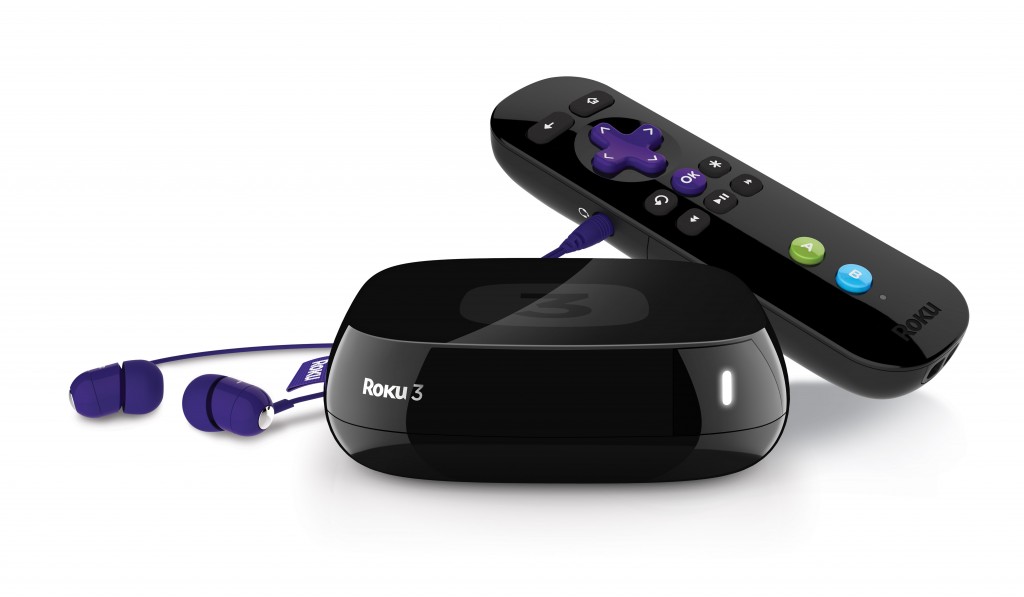
So, I bought a Roku 3 from eBay the other day and was a little surprised (but happy) to see it came with a UK plug. I had thought that it would work with my Logitech Harmony remote rather than having to use the one that comes with the Roku, but like the streaming stick, the Roku 3's remote works with RF signals. It can be used with the Harmony but I need to add the Harmony Hub, another €99 bought new - getting expensive... (I did add the Roku 3 to my Harmony remote obviously fairly shortly after having written this post, without needing a Harmony Hub, so that's good).
Anyway, because the Roku 3 is mains-powered it's always on unlike the Streaming Stick that was powered by USB cable to the amp. It's very responsive and the user interface is good-looking with possibilities to customise that weren't in the Streaming Stick. The Roku 3's remote shares features with the Wii-mote with motion sensors that allow for gestural control. It is something of a gimmick and used in a copy of Angry Birds Space pre-installed, but I don't really see other uses for it. The remote also has a 3.5mm headphone socket that cunningly mutes the TV and plays sound through attached headphones, making for non-disturbing viewing.
Plex playback through the Roku is satisfactory, though it would be good if you could turn on and off subtitles while watching the film rather than having to come back out, go into playback options and choose, then resume - to get the best quality (if your net connection supports it) up the rate to 10 MB 1080i, the picture quality is great.
Anyway, my Streaming Stick is on eBay for the next day or so here:eBay so go get a bargain.
PS. Gave my Chromecast to a great friend of mine. Previously, if they wanted to watch a film from the computer they needed to move the PC over to near the telly, hook up the HDMI cable and listen to the sound through the PC's tinny speakers - he is made up :)
2 February 2015
Plex and the TV
We have a nice computer set-up and a nice TV setup. I bought a Chromecast back when they were only available in the States since I thought it might link the two together and I've been quite happy with it. To start with it was more of a gimmick than anything else, being able to cast YouTube to a big screen is great, just not something you do all the time. Anyway, Chromecast got some new channels and my brother has long used a media server application called Plex on his Mac and Apple TV box at his home in England to stream stuff from his computer to the TV. Best of all, once I installed Plex I could do the same with the Chromecast and we could even share libraries (I'm watching The Wire for the first time thanks to this sharing).
The only slight downside to the Chromecast is that it has no interface. It needs to be controlled through a smartphone or tablet. This is fine for when I am in command, but it rather precludes my wife from the fun because she isn't as techy as me. Anyway, for Christmas the US company I work for, NewTek, bought all its staff a Roku streaming stick and a year's Amazon Prime. This is a lovely pressie for staff in the States because it means they get free access to all Amazon's streaming video (and can pay to watch films that aren't on Amazon Prime). However, with the international boundaries, copyright law and so on, that is not available to any of the staff in the rest of the world and I thought there wasn't much point replacing the Chromecast with the Roku...
It turns out there is a point after all. The Roku comes with its own remote (which is RF so I can't put its controls onto our Harmony remote, which would be even better), and navigation is done on the telly. This means my Fona can access all the stuff on Plex, including my brother's recordings, through the TV with a simple, familiar user interface. Because we have a very high speed internet connection, it's worth going into the Plex settings on the Roku to change the default picture quality up to 8MB/s 1080p and changing the sound to 5.1. Obviously that isn't magically going to give programmes higher picture and sound quality out of nowhere, but it does mean you'll get the best out of what you have.
Interestingly, this morning I found out about RARflix, which is a different user interface for Plex that gives more info and better filtering options. More on that as I use it.
In short, it looks like the Roku is going to replace the Chromecast and it may even be that I spring for a Roku 3 so that I can use our Harmony remote rather than having to have a second controller.
The only slight downside to the Chromecast is that it has no interface. It needs to be controlled through a smartphone or tablet. This is fine for when I am in command, but it rather precludes my wife from the fun because she isn't as techy as me. Anyway, for Christmas the US company I work for, NewTek, bought all its staff a Roku streaming stick and a year's Amazon Prime. This is a lovely pressie for staff in the States because it means they get free access to all Amazon's streaming video (and can pay to watch films that aren't on Amazon Prime). However, with the international boundaries, copyright law and so on, that is not available to any of the staff in the rest of the world and I thought there wasn't much point replacing the Chromecast with the Roku...
It turns out there is a point after all. The Roku comes with its own remote (which is RF so I can't put its controls onto our Harmony remote, which would be even better), and navigation is done on the telly. This means my Fona can access all the stuff on Plex, including my brother's recordings, through the TV with a simple, familiar user interface. Because we have a very high speed internet connection, it's worth going into the Plex settings on the Roku to change the default picture quality up to 8MB/s 1080p and changing the sound to 5.1. Obviously that isn't magically going to give programmes higher picture and sound quality out of nowhere, but it does mean you'll get the best out of what you have.
Interestingly, this morning I found out about RARflix, which is a different user interface for Plex that gives more info and better filtering options. More on that as I use it.
In short, it looks like the Roku is going to replace the Chromecast and it may even be that I spring for a Roku 3 so that I can use our Harmony remote rather than having to have a second controller.
16 November 2009
Review: Humax Foxsat-HDR
Intro
We live in France, so normally UK TV is unavailable to us through the aerial. However, the satellite that feeds Sky TV in the UK also feeds most of western Europe with other channels, so equipped with a secondhand Skybox, we have been able to watch the FTV and FTA channels broadcast to the UK. This was fine in so far as it went, however, recording something was a bit of a palaver. First we had to set our DVD recorder with hard drive to record the AV1 channel, the one Sky came into the box on, at a specific time, then we had to make sure the Sky box was on the right channel and lastly, and perhaps most importantly, we had to switch off the DVD recorder, because otherwise it wouldn't record. Yes, you could record different channels at different times without supervision because you have the autoswitch of the Sky box and you could set up multiple recordings on the DVD recorder, but it wasn't exactly easy or intuitive. Our Sky box is on its last legs, it sometimes takes ages to change channel and it gets locked onto Channel Five at times so we needed something new and shiny. I had considered going the HTPC route with MythTV, but that might be the next tech refresh for now I am very happy with the Humax Foxsat-HDR.
Review
Right, so onto the Humax and why it's great. To give you a better idea of what exactly this box is, it's a PVR (personal video recorder) designed for FreeSat, the UK satellite-based equivalent of the aerial-based Freeview. It gives you all available BBC channels, all ITV channels, Channel 4, E4 and more4 and Five, but not Five US or Fiver yet. It has twin tuners, so really benefits from a quad LNB setup (not that I have one, but more on that later). It has a 320 GB hard drive and a week-long EPG.
Unboxing
First up, getting it out of the box reveals not only the Foxsat itself, but a nice selection of cables - some AV CVBS cables; a SCART lead; HDMI lead. You get batteries for the remote, in short all you need. Well, all you need bar a loopthrough lead if you are going to one use it with a single LNB. With the Sky+ and Sky HD+ boxes these days you have multiple cables coming from your satellite dish because the receiver at the end of the arm in front of the actual dish (the LNB) contains multiple inputs, each of which travel down a cable, allowing to record one channel while watching another, etc. The FoxSat allows for this but doesn't force it on you. It has three socket F connections at the rear. Either you use connections 1 and 3 for your Quad LNB cables, or you just use connection 1 and a loop of cable between 2 and 3 for a single LNB. That's what we've got being an old Sky setup, so that's what we used.
You need to be careful to remove the plastic coating off not only the door at the front of the Foxsat, but also on the screen at the front of the box behind the door. Otherwise the remote has a hard time getting through. The remote that comes with is nice enough, but since we have a Logitech Harmony 525 I only used it for long enough to work out where the buttons that we'd use regularly were and then set up the Harmony.
Setup
When you first turn on the Humax, after you've screwed in the connectors for your single or quad LNB, there is a short set up period where the box reads the satellite and gets the channels it is able to. This read-through of available channels is extremely rapid in comparison with our old Sky box, but then it was over ten years' old. The Foxsat asks for your postcode to determine what BBC and ITV regions you should watch. Although we live in France, we still remember our postcodes for several of our previous UK addresses, so we only need to choose the one we wanted.
The Foxsat is obviously designed for the UK and is designed to watch UK TV, so the clock on the front, when shown, reports UK time - GMT or BST. This is not a problem and since recording is done merely by visiting the EPG and pressing OK to record the programme you want to (or the whole series), so the time is somewhat irrelevant compared to the juggling needed for recording previously.
EPG
The EPG deserves a paragraph to itself. While it is supposed to be more technical than the SKY+ guide, I really don't mind, being of a more technical bent myself. The layout is clear and tabs across the top of the screen have different-coloured edges, and you hit the four coloured buttons to get to them. If you click OK on a programme you get a box pop up that offers you the choice of watching, recording a single programme or the series. If you choose Watch the FoxSat will switch over to your chosen programme when ready. If, however, you choose Record, the Foxsat won't necessarily turn over channels on you, it can record in the background. Best of all, even with a single LNB cable, you can record a second channel, and even watch a third simultaneously, the channels just need to be the same polarity and Graham Thompson, a user on the AV forum who has created a superb spreadsheet that shows exactly what you can record and watch simultaneously.
Recording/Playback/Time shifting
The real test is the way the FoxSat is able to handle recording and playback, but as yet, I've only had this machine a day or so so it's too early to tell, however, all the "synthetic" tests I've conducted have worked brilliantly, the real test comes tomorrow morning when I need to record Five in the morning and something on ITV1 that has a fifteen-minute overlap. The theory says that both should be recorded with no problem, if not my life may be at risk. If I don't post on this blog ever again you'll know that there has been foul play involved in my disappearance.
Conclusion
The DVD recorder we bought last year was okay. It does what it says it can do, pretty much. It has problems recording to DVDs now and the hard drive can "hitch" so I am happy to relegate it to purely being a DVD player. One of the best things about the FoxSat box (although untested as yet) is that I can send SD video out of the SCART on it to the DVD recorder, meaning that even if we recorded HD video, we can give someone a disc of it (in SD since DVDs don't support HD video, plus HD video is protected and cannot be copied). All in all, this FoxSat by previously-unknown-to-me Humax is an incredible bit of kit. If you live in the UK and still pay Sky a monthly subscription, this is a way out if you can afford the single outlay of 250UKP, and can give up some Sky-specific channels, like Sky One. If you live in Western Europe and want to watch and record UK TV this is ideal again. Right now at least, I am happy to give it 5/5
We live in France, so normally UK TV is unavailable to us through the aerial. However, the satellite that feeds Sky TV in the UK also feeds most of western Europe with other channels, so equipped with a secondhand Skybox, we have been able to watch the FTV and FTA channels broadcast to the UK. This was fine in so far as it went, however, recording something was a bit of a palaver. First we had to set our DVD recorder with hard drive to record the AV1 channel, the one Sky came into the box on, at a specific time, then we had to make sure the Sky box was on the right channel and lastly, and perhaps most importantly, we had to switch off the DVD recorder, because otherwise it wouldn't record. Yes, you could record different channels at different times without supervision because you have the autoswitch of the Sky box and you could set up multiple recordings on the DVD recorder, but it wasn't exactly easy or intuitive. Our Sky box is on its last legs, it sometimes takes ages to change channel and it gets locked onto Channel Five at times so we needed something new and shiny. I had considered going the HTPC route with MythTV, but that might be the next tech refresh for now I am very happy with the Humax Foxsat-HDR.
Review
Right, so onto the Humax and why it's great. To give you a better idea of what exactly this box is, it's a PVR (personal video recorder) designed for FreeSat, the UK satellite-based equivalent of the aerial-based Freeview. It gives you all available BBC channels, all ITV channels, Channel 4, E4 and more4 and Five, but not Five US or Fiver yet. It has twin tuners, so really benefits from a quad LNB setup (not that I have one, but more on that later). It has a 320 GB hard drive and a week-long EPG.
Unboxing
First up, getting it out of the box reveals not only the Foxsat itself, but a nice selection of cables - some AV CVBS cables; a SCART lead; HDMI lead. You get batteries for the remote, in short all you need. Well, all you need bar a loopthrough lead if you are going to one use it with a single LNB. With the Sky+ and Sky HD+ boxes these days you have multiple cables coming from your satellite dish because the receiver at the end of the arm in front of the actual dish (the LNB) contains multiple inputs, each of which travel down a cable, allowing to record one channel while watching another, etc. The FoxSat allows for this but doesn't force it on you. It has three socket F connections at the rear. Either you use connections 1 and 3 for your Quad LNB cables, or you just use connection 1 and a loop of cable between 2 and 3 for a single LNB. That's what we've got being an old Sky setup, so that's what we used.
You need to be careful to remove the plastic coating off not only the door at the front of the Foxsat, but also on the screen at the front of the box behind the door. Otherwise the remote has a hard time getting through. The remote that comes with is nice enough, but since we have a Logitech Harmony 525 I only used it for long enough to work out where the buttons that we'd use regularly were and then set up the Harmony.
Setup
When you first turn on the Humax, after you've screwed in the connectors for your single or quad LNB, there is a short set up period where the box reads the satellite and gets the channels it is able to. This read-through of available channels is extremely rapid in comparison with our old Sky box, but then it was over ten years' old. The Foxsat asks for your postcode to determine what BBC and ITV regions you should watch. Although we live in France, we still remember our postcodes for several of our previous UK addresses, so we only need to choose the one we wanted.
The Foxsat is obviously designed for the UK and is designed to watch UK TV, so the clock on the front, when shown, reports UK time - GMT or BST. This is not a problem and since recording is done merely by visiting the EPG and pressing OK to record the programme you want to (or the whole series), so the time is somewhat irrelevant compared to the juggling needed for recording previously.
EPG
The EPG deserves a paragraph to itself. While it is supposed to be more technical than the SKY+ guide, I really don't mind, being of a more technical bent myself. The layout is clear and tabs across the top of the screen have different-coloured edges, and you hit the four coloured buttons to get to them. If you click OK on a programme you get a box pop up that offers you the choice of watching, recording a single programme or the series. If you choose Watch the FoxSat will switch over to your chosen programme when ready. If, however, you choose Record, the Foxsat won't necessarily turn over channels on you, it can record in the background. Best of all, even with a single LNB cable, you can record a second channel, and even watch a third simultaneously, the channels just need to be the same polarity and Graham Thompson, a user on the AV forum who has created a superb spreadsheet that shows exactly what you can record and watch simultaneously.
Recording/Playback/Time shifting
The real test is the way the FoxSat is able to handle recording and playback, but as yet, I've only had this machine a day or so so it's too early to tell, however, all the "synthetic" tests I've conducted have worked brilliantly, the real test comes tomorrow morning when I need to record Five in the morning and something on ITV1 that has a fifteen-minute overlap. The theory says that both should be recorded with no problem, if not my life may be at risk. If I don't post on this blog ever again you'll know that there has been foul play involved in my disappearance.
Conclusion
The DVD recorder we bought last year was okay. It does what it says it can do, pretty much. It has problems recording to DVDs now and the hard drive can "hitch" so I am happy to relegate it to purely being a DVD player. One of the best things about the FoxSat box (although untested as yet) is that I can send SD video out of the SCART on it to the DVD recorder, meaning that even if we recorded HD video, we can give someone a disc of it (in SD since DVDs don't support HD video, plus HD video is protected and cannot be copied). All in all, this FoxSat by previously-unknown-to-me Humax is an incredible bit of kit. If you live in the UK and still pay Sky a monthly subscription, this is a way out if you can afford the single outlay of 250UKP, and can give up some Sky-specific channels, like Sky One. If you live in Western Europe and want to watch and record UK TV this is ideal again. Right now at least, I am happy to give it 5/5
28 March 2009
Review: Logitech Z-5500 THX 5.1 sound system

I've wanted an amp and speaker setup since our Aiwa stereo packed in two years ago. That was only Pro-Logic, but there wasn't an easy replacement for it. Either we went for a dedicated tuner/amp and speakers or we were faced with having to buy a separate DVD player with amp and speaker combo, which I really didn't want to do. Then I spotted this set and found a few very positive reviews on it. Logitech's top-of-the-range speaker system has been around a while now (I found reviews from 2007), and I can see why in this age of rapid turnaround and obsolescence that is so. The Z-5500 handles Dolby Digital, Pro-Logic II, dts and is THX certified. The connections on the back of the control unit are one SPDIF optical, one SPDIF coax and three 3.5mm connectors. These can either be used for one direct 6-channel input, from a computer for instance, or three separate 3.5mm inputs - I have two used right now, one for an Airport connection and one for the Wii. There's also one 3.5mm input on the side for connections that aren't as "permanent" and a 3.5mm output for headphones.
The four main speakers are identical, while the centre speaker looks similar, but is on its mount horizontally rather than vertically. The Z-5500 comes with standard speaker cable for all five speakers in 4.5m lengths for the two front speakers and centre, and two 7.5m lengths for the rear speakers. The cables all connect to the sizeable and weighty subwoofer unit, as does the control box into which you plug the outputs from your sound generating devices.
We've tested the speakers with several movies now (Constantine, Kronk's New Groove and The Fifth Element) and speech was clear (apart from one sequence in Constantine we had trouble hearing in the cinema as well indicating a deeper-seated problem than just with this sound system), the surround was excellent and the bass was certainly rumbly enough. For playing music through iTunes (via an AirPort Express connection) was okay but seemed a bit thin until I swapped the effects mode on the amp to "Stereo x2", which duplicated the front speakers with the rear speakers. The Wii also outputs sound through the amp now and Sonic Unleashed (the only game I've tried so far) sounded great.
All is not perfect with the system. I would like it if the speakers didn't have their bases attached - the centre speaker is quite obtrusive in front of our TV. The 1-3 speaker switch isn't very well explained until you actually look into the manual, making the quick install sheet less useful, but the biggest problem for me is that considering Logitech also make a universal remote in the Harmony, the commands for the amp aren't very good. The effects switch between DD, dts, Stereo and Stereo x2 doesn't have discrete commands, but rather a simple toggle to switch between them meaning that you need to keep pressing that Effects button until your desired mode comes up, rather than simply hitting "dts" or Stereo x2 for instance. Considering the lack of feedback possible because the remote is purely a sending device, it seems daft to actually make it harder to know what Effects mode you are currently in.
Even with this black mark, the Logitech Z-5500 is an outstanding system. It may have been conceived purely for a rich kids' PC but it works for my needs as an AV amp admirably. 4/5
24 March 2009
HTPC
Pondering making a Home Theatre PC rather than having umpteen boxes (Sky decoder, Freesat HD decoder, Samsung DVD/HDD recorder) so that we can resell those things. I have a CPU (AMD Athlon X2 BE-2350) and graphics card (NVidia 8500GT) and the motherboard I am currently using (MS-7349) has 7.1 sound and HDMI out. I have an 80GB hard drive no longer in use (I know it's not too big) but the two things I really need are a DVB-S PCI tuner card and some means of making an IRDa remote control. I figure that my Harmony can drive it all with no problem, but I need a receiver. Oh yeah, and a case, which may well have the IRDa on it since it will be one designed to be an HTPC?
I'm thinking of going Linux with MythTV as the PVR, but I need more info, particularly on what tuner card to get and how to do the IR stuff...
Update: It seems that Logitech do a mighty fine set of THX-approved 5.1 speakers (ignore the price, I can get them for roughly half the amount Logitech sell them for on their own shop). I would like to get these anyway, regardless of setting up the PVR.
Update 2: Got the Logitech sound system and very good it is too. In my researches, I've found I need a Hauppauge Nova-SE2 DVB-S2 card to receive the satellite signal and record it and mythbuntu is looking good as an all-in-one Linux solution. It's unlikely that my AMD Athlon X2 BE-2350 is sufficient to drive a HD signal unfortunately, so the price for this box is going up. Right now, Hauppage card: 100€, CPU: 70€, memory: 40€, hard drive: 50€, case: 60€, new mobo for main computer 120€, IR stuff?
I'm thinking of going Linux with MythTV as the PVR, but I need more info, particularly on what tuner card to get and how to do the IR stuff...
Update: It seems that Logitech do a mighty fine set of THX-approved 5.1 speakers (ignore the price, I can get them for roughly half the amount Logitech sell them for on their own shop). I would like to get these anyway, regardless of setting up the PVR.
Update 2: Got the Logitech sound system and very good it is too. In my researches, I've found I need a Hauppauge Nova-SE2 DVB-S2 card to receive the satellite signal and record it and mythbuntu is looking good as an all-in-one Linux solution. It's unlikely that my AMD Athlon X2 BE-2350 is sufficient to drive a HD signal unfortunately, so the price for this box is going up. Right now, Hauppage card: 100€, CPU: 70€, memory: 40€, hard drive: 50€, case: 60€, new mobo for main computer 120€, IR stuff?
13 March 2009
Review: Philips 37PFL5603H 94 cm/37" LCD TV

Remember how I said I'd review the TV once we had it all set up? Well here we go.
Looks
This television looks fantastic. Its monolithic black construction might appear huge if not palliated by the fact that because it's so thin it doesn't seem to take up much space. The gloss black finish does mean it attracts dust like students are attracted to the Glastonbury festival though, so an anti-static cleaner is a must (or a Filipino maid on hand). Although we use our universal remote control (a Logitech Harmony 525), the remote supplied with the TV is a very no-nonsense understated black job.
I/O
This TV comes with three HDMI ports (two on the back with space for another, and one on the side), two SCART sockets, component and composite (on the side). The TV is a full HD set at 1920 x 1080p and has a built-in DVB HD tuner meaning that we get HD French TV. It also has a USB port on the side that you can put pictures, music and firmware upgrades on.
Performance
The first thing to do when you get the set is to turn off all the "intelligent" colour and brightness settings. They make the picture just too vivid, too saturated. Other than that picture quality is good, even on SD material and a good DVD really shines. The HD signal is something else entirely and it is amazing to see. Because our TV gets DVB, the French version of which is TNT, it means that some programmes, notably films, have multiple soundtracks, much like DVDs, so we can actually watch films that would normally be dubbed into French in their original English on French TV. Channel changes, particularly between HD channels feel very slow.
Conclusion
We bought this TV and then found that there was an offer in another shop that basically got the 42" version of the same TV for a little less than this cost, but it had only SD TNT and 42" would really be too big for our lounge I feel. So I am pretty happy with this set. It's still early days to be able to see how well it performs over an extended period and we haven't really explored all its features yet. It's our first HD set, so we might be overly amazed. An HD signal is great, but DVD brought over improvements than just resolution over VHS, so I'm still expecting to see something else - the fact that digital TV can have more language tracks and so on means that you do get additional features, but these are related to digital TV, not HD.
We are getting a Freesat HD box in the post shortly so I will update this review once we have that. 4/5
10 March 2009
New TV

Finally we got ourselves a new TV. We're sticking with Philips since our old set has done us proud for ten years. It's a 37" 1080p device catchily titled the Philips 37PFL5603H. I've downloaded the current firmware upgrade (bizarre, eh? How times change that we can upgrade our tellies!). The only fly in the ointment is that our local Intermarché is proposing a similar Philips 42" set for the same money and with a bunch back on our fidelity card. However, two strikes against it. 1, 42" is really too big for the distance we're playing with and 2, it doesn't have an HD tuner for the French equivalent of Freeview - TNT. I think I'm happy with this set. It's purty and there's an actual power switch to reduce the standby consumption of electricity to, well, 0w. Plus there's a chance I won't even need to reprogram the remote since it's a successor to the Philips TV we already have, and so the remote commands are likely to be similar enough.
I shall review it once it's here tomorrow night.
Subscribe to:
Comments (Atom)


